Friday, June 6, 2014

Parenting Nation Baby Photo Contest

Hello fellow bloggers, request you  to visit the given link and like this photo and help her win the parenting nation baby photo contest.
http://www.parentingnation.in/baby-photo-contest-india/_Babyname_Janvi_Pramanik_82526

Looking forward to your likes!

Thanks!

Friday, November 15, 2013

Book Review - Adobe Captivate 7 for Mobile Learning [eBook]


Ever since learning has become accessible irrespective of time and geography, learning and training professionals have been on the look out for mobile learning. I am sure most of us who belong to the learning and training industry are aware of the term mobile learning. Learning and training courses if made available on mobile can reduce the cost of training to some extent. Learning will not be restricted to sitting at desktops and working on laptops, but independent of these devices.

Earlier it was not possible for learning professionals to make eLearning courses available on cell phones. However, now Adobe Captivate 7 has made it possible to create mobile-friendly and interactive m-learning. With any smart phone having Android o/s or io/s and HTML5 web browser you can access m-learning content.

Adobe Captivate 7 was launched in June 2013. Since this is fairly new software, Damien Bruyndonckx has authored an eBook titled as Adobe Captivate 7 for Mobile Learning[eBook]. This eBook is meant for all the people who impart training as teachers, instructional designers, SMEs, eLearning developers, and curriculum experts.

This eBook covers steps to create mobile compliant screen cast, steps to capture mobile friendly simulation, steps to edit a project for mobile output, steps to optimize an existing project for mobile, how to deal with unsupported features, steps to create mobile friendly quiz, steps to publish a project for mobile, and steps to insert edge animate animations in a Captivate project, and lastly steps to package a Captivate HTML5 project as a native application. All the topics and sub-topics have been covered in detail with corresponding screenshots for ease of understanding using scenarios. This eBook covers the nitty gritty of Captivate 7 without making it verbose. This eBook comprises 136 pages and covers features of Captivate 7 that helps address mobile learning challenges. Moreover, you need not be a Captivate pro to be able to explore Captivate 7. All you need to do is to download a free 30-days trial pack of Adobe Captivate 7 and you should have access to an HTML5 web browser. What else, this eBook has made it even easier to learn and explore Captivate 7 for m-learning.
 

Wednesday, August 29, 2012

Exploring Captivate 6.0


Well I have been using Articulate and now I have had the chance to explore the Captivate 6.0 from an eLearning perspective.
Let me quickly list the new features of this too along with its advantages and limitations.
Adobe has introduced Characters and Interactions in this version of Captivate.


Now we all know who important have interactivities are as far as WBTs are concerned. Articulate Engage has already shown us a wide variety of interactivities that we readily use to pull out a WBT in no time. Captivate has done something similar. There are four categories of characters that Captivate provides; as shown below:


Nevertheless, my concern here is am not sure how useful these characters are. Some of these characters are not downloadableand some have weird expression that we can hardly use in our courses.

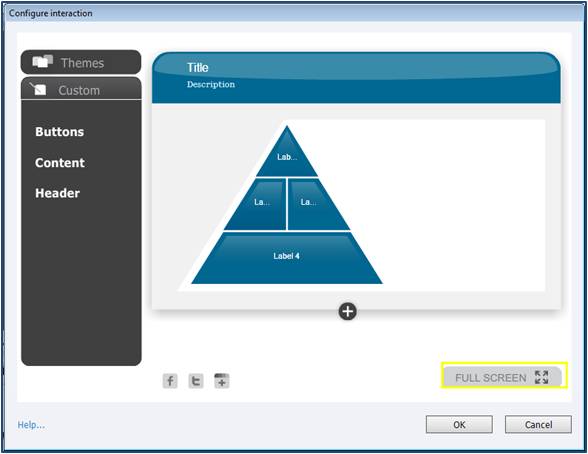
Next, let us move on to the interactions. There are 10 odd interactions and you can choose to download more. The interactions are as follows:

·         Accordion

·         Tabs

·         Process Circle

·         Pyramid Stack

·         Timeline

·         Circle Matrix

·         Pyramid Matrix

·         Glossary

·         Award Certificate

·         Word Search
For each interaction, there are 10 to 17 different types of themes. You can go ahead and customize these themes to suit your requirement.


You can customize the button color, button text - font type, font color, and font size.


Similarly, you can customize the look and feel of the content and header.


You can choose to either retain the header and description or remove it completely. All you need to do is to select the Header –On or Off button.


One of the limitations of these interactivities is that if the label or button text is too long, you can not customize the button size. Also, there are a maximum of 6 labels and buttons. What if the content is more and we need to add more labels? Nevertheless, the interactivities and characters are very intuitive and easy to use. It won’t take you more than 2 days to explore all the interactivities. You can add images and audio to all the button/label text.

That’s all for this post. Happy Captivating J

Sunday, November 20, 2011

Random Nothings

It's been two long years, since I have last blogged about anything. I guess certain constraints prohibited me from blogging. Time flies...and we can do nothing about it.

But am back, back to the world of blogs, back with my experiences and knowledge that I have gained so far as an ID.

Thought, before this year end, let me get back to this platform. Why save all the resolutions for the coming new year. After all we can have year end resolutions too!

So, here I am, resolving to post at least one article every fortnight / month about my day-to-day experiences, knowledge that I acquire, challenges that I face and how I go about them.

Happy blogging to me!

Sunday, November 8, 2009

Captivate 3-Patch Work

Currently am working on a WBT and for that am using Adobe Captivate 3 to capture demonstrations and for certain slides, I have to do patch work.

We all know that if the status of an application is WIP, one thing is clear that you can expect a lot of re-work. And that is precisely what is happening. My concern is that in certain slides where am doing patch work, once am merging it with the background, there's a slight shift which is noticeable if you closely look at it. One of my team mates suggested that I should lock that particular slide and the object to avoid making the shift of the patch work noticeable. Also once you merge an object with the background the quality deteriorates. Nevertheless, locking objects did work.


However, I wanted to know what one should do ideally while doing a patch should work on a slide. What is the best work around? Would be glad if people answer my query.

Saturday, July 18, 2009

Exploring an Authoring Tool

How do you go about exploring an authoring tool? What methods do you employ to create an Instructor-Led training on an authoring tool?

Here is what I did to explore and create a training material on Adobe® Captivate®4. It is an elearning tool that enables you to create powerful and engaging elearning course.

I was asked to create a HDD for the training material in such a way that the training could be completed within2-3 days. Most of the people believe that Help files are of no use. I would say the Help file is of immense use if only you know how to utilize it in the best possible way. Since this is a tool, you need to try out each and everything that you want to include in the training material.

The video tutorials provide you a basic understanding of all the major usage of the tool. Apart from this, I read up as much as possible to gather information to create the training material. Creating a step list along with relevant screen grabs, coupled with relevant demos can go a long way in making an instructionally sound training material. The most challenging part was to create the demonstrations without any glitches.

Let me list down the latest features that Adobe® Captivate® 4 offers:

  • provides professional design templates that provide a consistent look
  • enables the reviewers to add comments directly to your SWF files
  • allows you to import demonstrations created in Microsoft PowerPoint 2007 in the PPTX format, as well as the PPT format
  • allows you to edit PowerPoint content in Adobe® Captivate® 4

You can visit www.adobe.com/products/captivate/faq/ more information.

Saturday, May 30, 2009

Corporate Training....from a Learner's Perspective

This post is not about my new found knowledge about some eLearning tool or a new learning theory that I have come across. This post is on behalf of all those people who have to undergo some kind of training to upgrade their skills. Please note that I've made use of the word "have” i.e. it is mandatory for them in order to get into projects.

Well at a personal level I feel training sessions are a must. People without the right kind of skills or domain knowledge will fail to handle tasks involved in a project. In such a situation training sessions (formal or OJT) help lay a foundation for any upcoming projects. So it is always better to gather as much knowledge as possible before one gets started.

Although training sessions aim to improve one’s skill set and knowledge, however few learners/resources feel that these training sessions are taking away the innovation out of them? The fact that when a certain resource is asked to undergo any type of training they feel that they are taking these kind of courses and assessment just to save their jobs or to get into projects.

Well I didn’t carry out a survey of any sort hence I cannot claim what these handful of people are saying is true or not; but I would definitely say that when a learner is not motivated enough to take a course or training session, no matter how many strategies one applies it simply doesn’t work.

My question is that as an instructional designer how we can help these people who hate to be a part of any training curriculum to take up such sessions wholeheartedly. What are the possible ways whereby training sessions can be made more interesting?

Assessments that aim to clarify the misconceptions of learners become a threat when it is scored. The moment an assessment is scored so as to enable a resource to become a certified professional in ABC isn’t the whole purpose of the training purpose defeated. If we are focussing on enhancing the skill set why do we need to score a course/training session? Why can’t we assess the resource on the job, while reviewing their work, so on and so forth?

I believe that few things like trimming down the seat time of a course, breaking vast lessons into smaller chunks, and/or making assessments a bit easier can help a long way to build confidence amongst the learners.

I leave it at that; because I don’t see an end to it. Nevertheless, I would like to know how to create curiosity and sustain it throughout a course without making learners/resources famished.